
Initial#
This challenge is a file called 5get_it which the file command detects as a Windows DLL. DLL files are much like EXE files in that they contain executable code, however they are not normally executed but instead called by a primary executable or another DLL.
But why male models DLLs?#
Imagine you write a simple text editor from scratch. You start by designing a GUI, but wait.. you gotta write a GUI formatting engine from scratch right? Also, when you save the text file, you have to write code to detect a disk, parse the file structure, write each byte of text to disk and miraculously not FUBAR your OS in the process. Thankfully, Windows has a bunch of built in features that handles all that pain for you, so you just call the dynamic linked libraries (DLLs) for GUI stuff, file stuff etc. You can even use third party DLLs or hell, even your own to make life easier. So, instead of starting from scratch, just use other people’s code.
Another good feature of using DLLs is segmenting an application into smaller parts. When you got to change a small bug, you don’t need to ship a behemoth blob back to the userbase.
DLL Exports#
A DLL will normally contain hundreds if not thousands of functions, many of them useless to the end user. DLLs will however offer some functions as starting points that are available to an application for use, called Exports. Think of them as calls you can make from the DLL to do stuff. Imagine a DLL that creates ZiP files, one export may be called ‘compressFiles’ and another may be ‘decompressFiles’. You will get what it does, and all you got to do is pass parameters to it like file paths, zip name, etc.
Do EXEs have Exports?#
Short answer - YES! In fact the one main difference between an EXE and a DLL is the fact of a particular export called ’entry’ in an EXE. This tells Windows where to start running code. DLLs can have them, but EXEs definitely have to have them. Anyways, back to the binary.
Entry Analysis#
I loaded the dll into Ghidra which is one of the best reverse engineering tools available for free today. It has many features which are too expansive to document, however one thing you can see is the exports available from a DLL. What is interesting however is that it only lists one, entry.
With Ghidra, you are also given a pseudocode decompiled representation of any function you look at. The entry function is represented as follows;
void entry(undefined4 param_1,int param_2,int param_3)

{
  if (param_2 == 1) {
    ___security_init_cookie();
  }
  ___DllMainCRTStartup(param_3,param_2,param_1);
  return;
}
The ___security_init_cookie() function is a normal compilation function as is ___DllMainCRTStartup() for a DLL, but it’s in there that holds what is actually happening. Any function renamed to something funky can be taken as system based stuff that we don’t need to care about. User functions however is where the cool kids hang out, and they’re prefixed with FUN_. Looking inside the DllMain func, one emerges, FUN_1000a680(). This is where we should start our investigation.
FUN_1000a680#
Remember how we talked about DLLs and how they have exports? Well it is incredibly common to see other EXEs of even other DLLs call other DLLs like we mentioned.
Some basic Windows DLLs that are available to a binary from the get go are:
- kernel32.dll - Allows the program to perform basic tasks.
- user32.dll - The Window Manager. Handles graphics
Note that I’ll leave it up to you to research the DLLs and the corresponding exports, but I’ll give a basic idea what’s going on.
Here is the raw function from Ghidra.
void FUN_1000a680(void)
{
  BOOL BVar1;
  DWORD DVar2;
  undefined **ppuVar3;
  char *_Format;
  HMODULE local_120;
  undefined4 local_11c;
  undefined4 local_118;
  int local_114;
  HWND local_110;
  CHAR local_10c [260];
  uint local_8;

  local_8 = DAT_100185b4 ^ (uint)&stack0xfffffffc;
  AllocConsole();
  local_110 = FindWindowA("ConsoleWindowClass",(LPCSTR)0x0);
  ShowWindow(local_110,0);
  local_114 = FUN_1000a570();
  local_120 = (HMODULE)0x0;
  BVar1 = GetModuleHandleExA(6,(LPCSTR)FUN_1000a610,&local_120);
  if (BVar1 == 0) {
    DVar2 = GetLastError();
    _Format = "GetModuleHandle returned %d\n";
    ppuVar3 = FUN_1000ad77();
    _fprintf((FILE *)(ppuVar3 + 0x10),_Format,DVar2);
  }
  GetModuleFileNameA(local_120,local_10c,0x100);
  if (local_114 == 2) {
    CopyFileA(local_10c,"c:\\windows\\system32\\svchost.dll",0);
    local_118 = FUN_1000a610((BYTE *)
                             "c:\\windows\\system32\\rundll32.exe c:\\windows\\system32\\svchost.dll "
                            );
  }
  local_11c = FUN_1000a4c0();
  __security_check_cookie(local_8 ^ (uint)&stack0xfffffffc);
  return;
}Analysis#
It’s a little daunting when you start looking at code this way, so let’s break it down as much as we can.
  local_8 = DAT_100185b4 ^ (uint)&stack0xfffffffc; // ignore - Later used in Security Cookies
  AllocConsole(); // kernel32.dll - Create a console window
  local_110 = FindWindowA("ConsoleWindowClass",(LPCSTR)0x0); // user32.dll - find the newly created window
  ShowWindow(local_110,0); // user32.dll - hide the window
  local_114 = FUN_1000a570(); // something happens
Here’s what has just happened:
- A console window (command line) is spawned using
kernel32.AllocConsole - It is located, and then hidden from the user’s view. The value
0marks it as hidden. - A currently unknown function
FUN_1000a570is ran, and the value of whatever happens is stored inlocal_114.
  local_120 = (HMODULE)0x0; // Location to store the handle
  BVar1 = GetModuleHandleExA(6,(LPCSTR)FUN_1000a610,&local_120);  // Get the handle of the dll being executed. BVar1 is a success code
  if (BVar1 == 0) { // If Success code is 0, abort
    DVar2 = GetLastError();
    _Format = "GetModuleHandle returned %d\n";
    ppuVar3 = FUN_1000ad77();
    _fprintf((FILE *)(ppuVar3 + 0x10),_Format,DVar2);
  }
This is a little more complicated. Right now, the DLL has no real context about itself outside of the code it is running. GetModuleHandleExA gets a handle, i.e. a reference of the DLL in memory. It loads the address of the start of the DLL into local_120 and it returns a success code into BVar1. A success code just means if it was successful or not. If it is 0, the process failed and it calls a new unknown function and probably exits.
  GetModuleFileNameA(local_120,local_10c,0x100); // kernel32 - Get the full file path of the DLL, store it in local_10c
  if (local_114 == 2) { // output of FUN_1000a570(). If '2', do this
    CopyFileA(local_10c,"c:\\windows\\system32\\svchost.dll",0); // Copy the DLL to system32
    local_118 = FUN_1000a610("c:\\windows\\system32\\rundll32.exe c:\\windows\\system32\\svchost.dll "); // Possibly execute the dll using rundll32
  }
  local_11c = FUN_1000a4c0(); // Unknown func
More complicated calls emerge, but let’s break it down again:
GetModuleFileNameAis called withlocal_120as the reference (the DLL handle). This will resolve the location of the DLL on disk and store it inlocal_10c- Remember that unknown function that returned a value? Here is where it gets useful. If the returned value is
2, it will run:CopyFileA- as the name describes. Copy the DLL path tosvchost.dll- Call an unknown func. Note that the string is basically
rundll32.exewith the path of the newly copied dll
A dll file will not run by itself like an exe. You can however run it using rundll32 and it will behave just like an exe. The string indicates that this function will do precisely that.
Conclusion and Next Steps#
This function:
- Creates and hides a console window
- Reads a return value from
FUN_1000a570 - Resolves the location of itself, and if the returned value is
2, copy and possibly run the dll from the new location
Next steps:
- Analyze
FUN_1000a570- return value func (Not high importance, likely just a validator) - Analyze
FUN_1000a610- rundll func - Analyze
FUN_1000a4c0- Unknown
I in fact analyzed the first two functions quickly and saw they were pretty basic so I skipped them. The flag must be somewhere in the last func.
FUN_1000a4c0#
Here’s the raw func from Ghidra
undefined4 FUN_1000a4c0(void)

{
  uint uVar1;
  void *_Dst;
  char *pcVar2;
  int iVar3;
  undefined2 local_c;

  do {
    uVar1 = FUN_1000abbe();
    iVar3 = (int)uVar1 % 200 + 0x32;
    _Dst = _malloc(iVar3 * 0xf);
    _memset(_Dst,0,iVar3 * 0xf);
    Sleep(10);
    local_c = 0;
    while (local_c < iVar3) {
      Sleep(10);
      pcVar2 = FUN_10009eb0();
      if (pcVar2 != (char *)0x0) {
        FUN_10001000(pcVar2);
        local_c = local_c + 1;
      }
    }
  } while( true );
}
The first obvious item is the do {...} while( true ) piece which means it will loop forever. Interesting.
    uVar1 = FUN_1000abbe();  // Generate random number
    iVar3 = (int)uVar1 % 200 + 0x32; // Convert the number to 50-249
    _Dst = _malloc(iVar3 * 0xf); // Allocate a temporary buffer with size iVar3 * 0xf
    _memset(_Dst,0,iVar3 * 0xf); // Set the buffer with zeroes
I took a look at the first function and it just generates a random number. The next line performs a % 200 + 0x32 which is a modulus of the returned value, meaning that it can only have a value of 0-199, then 0x32 (50) is added to the number.
Next, a temporary buffer of the modulated size is created (_malloc) and filled with zeroes (_memset) however this appears to be never used, so we can ignore this.
    Sleep(10);
    local_c = 0;
    while (local_c < iVar3) {
      Sleep(10);
      pcVar2 = FUN_10009eb0();
      if (pcVar2 != (char *)0x0) {
        FUN_10001000(pcVar2);
        local_c = local_c + 1;
      }
    }
This is likely where the magic happens. The Sleep call does just that, pauses the process for 10 milliseconds. Next, there’s a while loop which loops the amount of whatever is in iVar3 (between 50 and 249).
FUN_10009eb0 is called, and if the return value is not 0, will run FUN_10001000 which is a small function that writes data to svchost.log. The true nature of what is happening here is in the func FUN_10009eb0.
FUN_10009eb0#
char * FUN_10009eb0(void)

{
  SHORT SVar1;
  char *pcVar2;
  short local_8;

  local_8 = 8;
  do {
    if (0xde < local_8) {
      return (char *)0x0;
    }
    SVar1 = GetAsyncKeyState((int)local_8);
    if (SVar1 == -0x7fff) {
      if (local_8 == 0x27) {
        pcVar2 = FUN_100093b0();
        return pcVar2;
      }

      // Truncated

      if (local_8 == 0x59) {
        pcVar2 = FUN_10009de0();
        return pcVar2;
      }
      switch(local_8) {
      case 8:
        pcVar2 = FUN_10009e60();
        return pcVar2;

	// Truncated

      case 0xbe:
        pcVar2 = FUN_10009e40();
        return pcVar2;
      }
    }
    local_8 = local_8 + 1;
  } while( true );
}
I have truncated this massively, but the crucial evidence to determine what’s happening is GetAsyncKeyState which essentially reads the keyboard. If you remember also that when a value is returned, it is saved in a log file. Reading keys + saving to log file = a KEYLOGGER.
Of course we should remember that this is not the real secret, rather that this is a CTF challenge. There are dozens of mini functions, each mapped to a key that when it is pressed, will execute the small function.
Looking at the first function, this looks like a normal keylogger.
if (local_8 == 0x27) {
pcVar2 = FUN_100093b0();
return pcVar2;
}

undefined * FUN_100093b0(void)
{
  return &DAT_100141bc; // Mapped to a byte of value 0x27
}
So when char 0x27 (the ' character) is pressed, it copies this from a data table, and sends it to the log file. While this is slightly weird, we can consider it ’normal’ for this keylogger to do. So, are there any deviations? Well yes…
The func for char 0x28 shows a call to a new function:
undefined * FUN_100093c0(void)
{
  FUN_10001060();
  return &DAT_100141c0;
}

void FUN_10001060(void)
{
  DAT_10017000 = 1;
  DAT_10019460 = 0;
  DAT_10019464 = 0;
  DAT_10019468 = 0;
  DAT_1001946c = 0;
  DAT_10019470 = 0;
  DAT_10019474 = 0;
  DAT_10019478 = 0;
  DAT_1001947c = 0;
  DAT_10019480 = 0;
  DAT_10019484 = 0;
  DAT_10019488 = 0;
  DAT_1001948c = 0;
  DAT_10019490 = 0;
  DAT_10019494 = 0;
  DAT_10019498 = 0;
  DAT_1001949c = 0;
  DAT_100194a0 = 0;
  DAT_100194a4 = 0;
  DAT_100194a8 = 0;
  DAT_100194ac = 0;
  DAT_100194b0 = 0;
  DAT_100194b4 = 0;
  DAT_100194b8 = 0;
  DAT_100194bc = 0;
  DAT_100194c0 = 0;
  DAT_100194c4 = 0;
  DAT_100194c8 = 0;
  DAT_100194cc = 0;
  DAT_100194d0 = 0;
  DAT_100194d4 = 0;
  DAT_100194d8 = 0;
  DAT_100194dc = 0;
  DAT_100194e0 = 0;
  DAT_100194e4 = 0;
  DAT_100194e8 = 0;
  DAT_100194ec = 0;
  DAT_100194f0 = 0;
  DAT_100194f4 = 0;
  DAT_100194f8 = 0;
  DAT_100194fc = 0;
  _DAT_10019500 = 0;
  return;
}
The function itself sets an array variables to zero, except the first one. This like a reset of some sort. So it looks like an array of vars are being tracked and during certain key presses, they are reset.
Working Theory and Solution#
My assumption at this stage is that keys need to be pressed in a certain order in order to reveal the flag. If the wrong key is pressed, the process is reset and it must start from the beginning again. So, how do we follow the breadcrumbs? Thankfully Ghidra has the ability to see when a variable is read or written to.
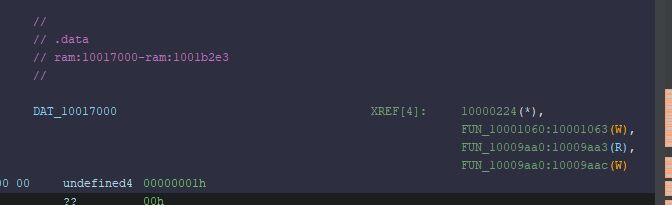
It shows that one function writes the variable, and one reads and writes to the variable. The first func is the reset function (renamed to ResetFlag). Let’s look at the other func:
undefined * FUN_10009aa0(void)
{
  if (DAT_10017000 < 1) {
    if (DAT_100194c0 < 1) {
      ResetFlag();
    }
    else {
      DAT_100194c0 = 0;
      DAT_100194c4 = 1;
    }
  }
  else {
    DAT_10017000 = 0;
    DAT_10019460 = 1;
  }
  return &DAT_100142d0; // `l`
}
This checks to see what the conditions of the array. If the first var DAT_10017000 is set, it will unset it, and set the next var DAT_10019460. Note also that there’s a secondary check for DAT_100194c0 which implies that this key needs to be pressed twice. I’m starting to figure out that the flag is what’s needed to be entered in order for it to work. This function was for the char l so that implies that l appears twice in the flag.
Migrating the array into a string where discovered chars are replaced, the flag looks like this:
l????????????????????????l???????????????
I spidered through the DAT reads until the final flag revealed itself
l0ggingdoturdot5tr0ke5atflaredashondotcom -> l0gging.ur.5tr0ke5@flare-on.comFunctions Observed#
| API Call | Library | What the call does |
|---|---|---|
| AllocConsole | Kernel32.dll | Creates a new console window and attaches it to the current process so that stdout/stderr become valid. |
| FindWindowA | User32.dll | Looks up a top‑level window by class name; here it finds the freshly created console ("ConsoleWindowClass"). |
| ShowWindow | User32.dll | Changes a window’s visibility. The code passes 0 ( SW_HIDE ) to hide the console from the user. |
| GetModuleHandleExA | Kernel32.dll | Retrieves a handle (HMODULE) to the module. |
| GetLastError | Kernel32.dll | Returns the error code from the most recent Windows API call (used when GetModuleHandleExA fails). |
| GetModuleFileNameA | Kernel32.dll | Retrieves the full path of the current DLL/executable into a buffer. |
| CopyFileA | Kernel32.dll | Copies the binary to C:\Windows\System32\svchost.dll. |
CreateProcessA (indirect via FUN_1000a610) | Kernel32.dll | Launches rundll32.exe with the copied DLL as an argument, causing Windows to load and execute it. |