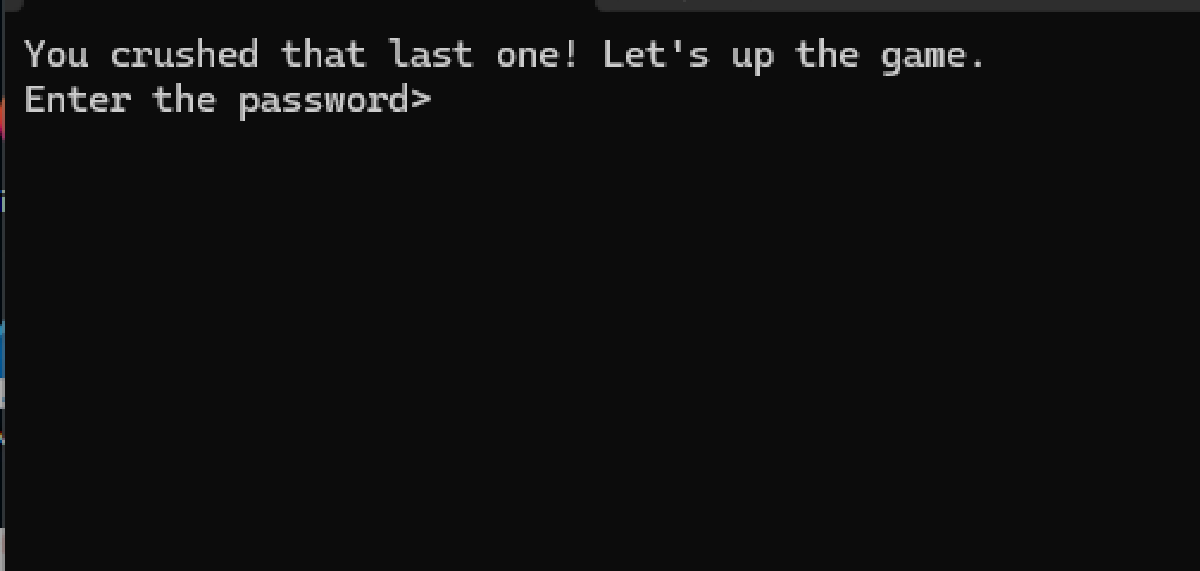

New challenge, but looks like it’s similar to the intro one:
Off to Ghidra we go again… well, not quite. Looking at the code in Ghidra didn’t work out well as the code is designed outside of normal working parameters and therefore didn’t render as cleanly as before.
Instead, I ran this in a debugger, namely x32dbg which allows you to watch the program run step by step. It’s a good time to start explaining this tool now as it will be used HEAVILY in future challenges. This also forces us away from using the C pseudocode that Ghidra was serving us with gratitude and instead starting to read the actual assembly code. It is not easy if you are new to this, but with some patience you’ll see it’s actually not that hard to understand, but more complicated to follow. My advice is to literally go step by step, make a note of your observations and continue. The patterns will come to you in time, but this will require a lot of practice.
I’ve written a comprehensive guide here
The first line of user code is a call to 0x0040100 which appears to be the main function.
Examining Function 00401000#
I don’t normally go into extreme detail but for this function it may be good to do so.
Unusual Preamble#
When entering a function, there is normally some preamble code that looks like this:
push ebp
mov ebp,esp
sub esp,X
A reminder that ebp or the base pointer is the address of the start of the stack for this particular function. As we are moving into a new one, it pushes the previous functions base pointer address to the stack for later retrieval. It then takes esp or the stack pointer address of the previous function, and copies it to ebp, effectively making this address the new function’s base pointer. Finally, a stack buffer is created of X bytes. This function will then store data within this buffer for whatever reason.
When the function finishes, the opposite happens. The base pointer is moved back to esp and the pushed old ebp is popped back into position, ready for the previous function to continue.
mov esp,ebp
pop ebp
ret
You should see that when entering this function, the stack pointer is pointing to the address of the instruction after the call into this function. This is normal behaviour as when the ret command is ran, it simply pops this into eip and the program continues from there.
In this function however, you probably have noticed that the very first instruction is pop eax which pops the value at the top of the stack (the return address) to EAX. This is potentially problematic as the program will not know where to return to when it is finished its function unless it is replaced later on. Take note of this as the reason why this happened will be evident in the future.
GetStdHandle#
The program wants to interact with the console terminal it is in. To do that, it creates two handles (references) so it can use them later. If you remember, sometimes values get pushed to the stack so they can be used by an upcoming call. This is evident in the next few calls. I’ll only highlight the important values.
GetStdHandle Reference to see how the pushed values work
push FFFFFFF6                        // -0x10 - means return the input handle (take user input)
call dword ptr ds:[<GetStdHandle>]   // Get the handle. Store the value in eax
mov dword ptr ss:[ebp-C],eax         // Move this to ebp-0xc

push FFFFFFF5                        // -0x11 - means return the output handle (print to screen)
call dword ptr ds:[<GetStdHandle>]   // Get the handle. Store the value in eax
mov dword ptr ss:[ebp-8],eax // Move this to ebp-8WriteFile#
Basically, print something in the console (truncated). Among other things, the string length and the address of the string are pushed to the stack.
push 43                           // Length of string
push 02_very_success.4020F2       // Address of string "You crushed that last one! Let's up the game.\r\nEnter the password>"
push dword ptr ss:[ebp-8]         // Output Handle
call dword ptr ds:[<WriteFile>] // print the stringReadFile#
Same but opposite, take input from the console.
push 32                         // Max length of input
push 02_very_success.402159     // Where to store the input
push dword ptr ss:[ebp-C]       // Input Handle
call dword ptr ds:[<ReadFile>]  // Read the input
Once the code gets this far, it will pause waiting for you to enter in the password. For now, enter in any random string. I put testing123. Note that ReadFile also stores the length of the input returned in [ebp-4]. This is observed coming up.
Preparing for FUN_00401084, and the aftermath#
We can see an upcoming call 02_very_success.401084 instruction. There are a few pushes performed before this indicating they are needed in this function.
push 0                         //  Currently unknown
lea eax,dword ptr ss:[ebp-4]   //  Copies the address at [ebp-4] into eax (location of input string length)
push eax                       //  Pushes said address
push 11                        //  Currently unknown
push dword ptr ss:[ebp-4]      //  The actual input length
push 02_very_success.402159    //  The string returned by ReadFile (testing123)
push dword ptr ss:[ebp-10]     //  The address for the return value of the function (remember this?)
call 02_very_success.401084
It will be common that values being set up to be used by a future function don’t make sense initially. I tend not to stress too much about them, just note the important ones like in this case:
- The input length
- The input string
- The return address value The last one is strange as a subfunction in theory should never need this information. Judging by what’s being set up, it’s likely the string check is happening in there. Before we dive into that however, let’s see what happens when it’s over.
add esp,C                          // Increase the stack size (Normal behaviour)
test eax,eax                       // Check if eax is 0
je 02_very_success.401072          // If it is, jump to 401072
push 02_very_success.402135        // "You are success\r\n"
jmp 02_very_success.401077
; 401072
push 02_very_success.402147        // "You are failure\r\n"
; 401077
push dword ptr ss:[ebp-8]
call dword ptr ds:[<WriteFile>]    // Print string
...
In x32dbg, the jumps are visualized clearly on the left of the instructions

eax, implying that the function must return a value in there. The next command test eax, eax is a simple way to test if the value in there is zero.
The reason why this is done is shown in the next line. je (jump if equal) in this instance means jump here if the test was zero. I’ve added two address labels for clarity, but the code would continue at 401072. We see a string being pushed saying you’re a failure. This is clearly bad. If however eax is not zero, then the je would be skipped, a success string is loaded, and a jmp command is ran which means jump here no matter what.
From the above, we can deduce that in order for this challenge to be successful, we need eax to be not zero.
Examining Function 00401084#
So, the goal is getting this function to return a non-zero value in eax. I’ve skipped the preamble as it should be familiar now and the first set of instructions are interesting.
xor ebx,ebx                     // Clear value in ebx
mov ecx,0x25                    // set ecx to 0x25
cmp dword ptr ss:[ebp+10],ecx   // Compare [ebp+10] with ecx
jl 02_very_success.4010D7 // Jump if less than ([ebp+10] < ecx)- The above clears
ebxas XORing a register by itself will always make it zero. - Next, it moves 0x25 to
ecx, and compares it to the value in[ebp+10]. Note that when a function is working on its own stack, theebpoffset will always be less thanebp(e.g.[ebp-10]). If however it wants to take data from the function that called it (the values pushed to the stack before the function got called), then it would be a positive offset ([ebp+10]). - After the comparison, if
[ebp+10]is less than0x25, it will jump to4010D7.
Looking at the code in this address, it sets eax to zero and exits, so this is a bad path.
What’s in [ebp+10]?#
When looking at the stack, it can be difficult to determine what values are being referenced. A handy trick in x32dbg is stepping to the instruction in question, and looking at the small window below the instructions:
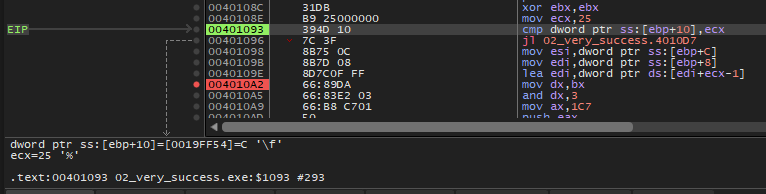
Looking at the stack, it becomes a little easier to read. The line above the pink braces is your ebp. The lines below it is the previous functions stack. Base pointer offsets are normally done in increments of 0x4, so 0x10 (16) would be the 4th line below the base pointer.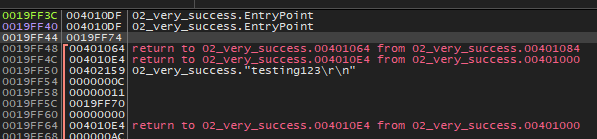
This shows that the value in that address is 0xC which is the length of the string passed (12 chars). As this is less than 0x25, it will naturally jump to the bad path. Okay, so first learning is that the input needs to be at least 0x25 (37) chars long. Note that the entered input will have two chars added at the end \r\n which are special formatting characters, so in fact the input string only needs to be at least 35 chars long.
Rerunning the challenge with the input ABCDEFGHIJKLMNOPQRSTUVWXYZ0123456789 which is 36 chars long passes this check.
Input Validation Check#
Now that the first hurdle is cleared, the real core of the challenge is in this small block of code.
Without looking too hard at the code, there’s some data sent to esi and edi then a continual loop. It appears to check something and it jumps out of the loop when something happens. At first glance it is likely checking the input against something character by character, and if there’s a mismatch, it fails. Let’s see.
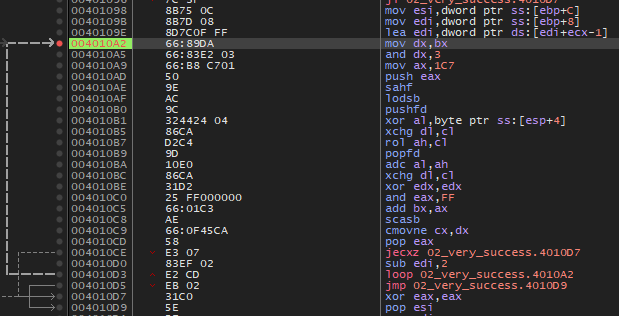
Preparing the data#
I mentioned before that esi and edi are used as a source and a destination. In this case, it can also be used to compare data between two locations. The first three instructions sets this up.
mov esi,dword ptr ss:[ebp+C]         // Address of the inputted string
mov edi,dword ptr ss:[ebp+8]         // Address of the return address of the previous function
lea edi,dword ptr ds:[edi+ecx-1]     // The address of above + ecx (0x25) - 1
The first instruction loads the input string into esi which makes sense if a comparison is about to commence. What is unusual is the value of edi in the second line is the return address for this function. In a normal binary, this would be unusual. As this is a CTF, maybe the flag is stored there instead.
Stepping through this instruction, the address for this is data is stored in edi. Once this is done, right click on edi and select Follow Dump. This will show the bytes stored at this address.

This appears to be an encrypted blob of 0x25 chars long. This is a commonly observed technique in Flare-On challenges, where an input is taken, is encrypted somehow and compared against the encrypted blob. If it matches, the flag is revealed (usually the correct input).
The third instruction moves edi to the end of the string (starting at A8). As it is starting there, the blob is likely reversed, and will work backwards through the blob.
Encryption Technique#
I’ll admit and say that I spent a lot of time trying to parse out what exactly is happening here. Before the loop starts, here are the important values to watch
ebx- Was set to zero at the start of the function and is used as an offset lateresi- The starting byte of the input stringedi- The ‘starting’ byte of the encrypted payload (actually the end of it.)
I’ve also removed some lines that to me weren’t useful. Let’s take a look at the first piece.
; 4010A2
mov dx,bx                    // Copy bx (offset) into dx (Note: bx/dx is only two bytes)
and dx,3                     // Perform an AND 0x3 against the offset
mov ax,1C7                   // Copy 0x137 to ax
push eax                     // push the above to the stack
lodsb                        // Loads the byte at esi to al (user input)
xor al,byte ptr ss:[esp+4]   // XORs the lowest byte in of 0x137 (0x37) against the loaded byte in al
bx was 0 starting out but this will likely update as the loop progresses. It is copied to dx (remember it is only the two bottom bytes). An and is performed on this newly copied value with 0x3. This is a bitwise operation. This basically removes all but the two lowest bits of the value, meaning it can only be of a value between 0-3. As dx is 0 on the first run, it is also 0.
A hardcoded value 0x137 is loaded into ax, then is pushed to the stack. The rather short lodsb is next which does a few things. First it copies the byte at esi which is the input string to al, then increments esi by one, essentially moving to the next byte in the input.
Finally, the byte that was just loaded is XORred with the value that was just pushed to the stack. As it’s a one byte calculation, it only uses the 0x37 byte.
Now, the next few instructions should be stepped through slowly in the debugger to see how the flow works. I found this much easier to understand after a few iterations.
xchg dl,cl                   // Swap dl and cl
rol ah,cl                    // Rotate left the bits in ah by cl
adc al,ah                    // al + ah with a carry flag (1)
xchg dl,cl                   // swap them back
xor edx,edx                  // clear edx
So, again, I didn’t understand this process until I watched it live in the debugger, but here’s the basic layout:
- Take the next (or first) input char.
- XOR it with
0xc7 - Next, use the offset (which at the beginning is 0),
andit with0x3, and apply a rotate left on the0x01byte that is ineax(or ratherah). - Add this value to the XORred input char, and because it’s add with carry, add an extra 1.
- Compare this to the encrypted char at the same position.
- If the do not match, exit the loop as you have failed.
- If it does match, then continue, but first, add the encrypted char to the offset.
I wrote a brute forcer to try all byte combinations.
encrypted_data = "AF AA AD EB AE AA EC A4 BA AF AE AA 8A C0 A7 B0 BC 9A BA A5 A5 BA AF B8 9D B8 F9 AE 9D AB B4 BC B6 B3 90 9A A8".split(" ")
encrypted_data.reverse()

offset = 0
for i in range(len(encrypted_data)):
    enc_byte = int(encrypted_data[i], 16)
    for i in range(0, 255):
        a = i ^ 0xc7
        a += (1 + (1 << offset)|(1 >> (8 - offset)))
        # a += 2
        if a == enc_byte:
            print(chr(i), end='')
            offset += enc_byte
            offset &= 0x03
            break
When I execute, I get the flag: a_Little_b1t_harder_plez@flare-on.com
The overall mechanism wasn’t tough, but what caught me off guard was the rotate left (rol) command which really confused me, but watching it work in the debugger made life easier.