
Initial#
This challenge introduces a new element which is seen in future challenges, a pcap file. A pcap file is a packet capture file which captures raw network traffic. The key tool to record and analyse network traffic is WireShark which is a commonly used tool in certain areas of cyber.
PCAP Analysis#
Opening the pcap in WireShark shows us network traffic. If you’re unfamiliar at how traffic works, you’re going to have a hard time understanding this, but just think of it as an unfiltered raw conversation between two objects, a source and a destination. We see that both sides of the conversation are 127.0.0.1 which is localhost or the local computer that it was ran on.
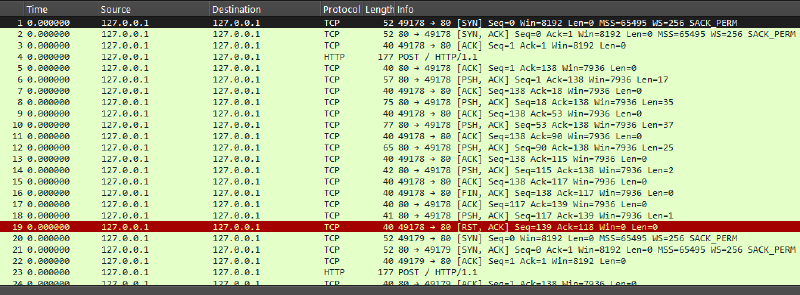
You will see that the destination port is 80 implying that it’s running HTTP or a standard web server. A high port called an ephemeral port is created to talk to port 80. This port will change over time, as it is set up usually for a one off communication. To see the conversation more clearly, right click the first event and click Follow -> TCP Stream. This puts together the stream of data, both the request and the response in a clearer format.
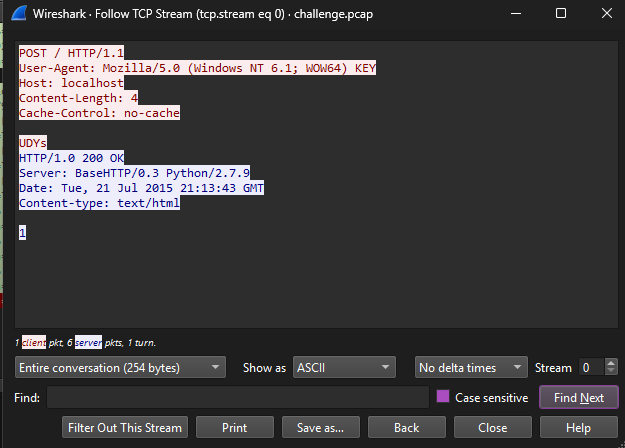
In red is the request, standard HTTP headers are seen, with the body of the request which is just 4 char long: UDYs. The blue is the server response with its own headers and the response 1.
WireShark has a nice feature if you want to go to the next TCP stream, just click the up arrow on the bottom right next to ‘Stream’ and it will bring you to the next piece. Here we see the same, except it’s 4 new chars. This pattern continues until all of them are observed. The last two bytes are == indicating it’s likely a base64 of some sort. The full string when put together is: UDYs1D7bNmdE1o3g5ms1V6RrYCVvODJF1DpxKTxAJ9xuZW==
Binary Analysis#
When you encounter pcap + binary challenges in these types of challenges, it’s indirectly telling you the flag is in the pcap, and the binary tells you how it was built.
I took a look around and came across FUN_00401100 which seems to contain the meat of the operation.
First up, it reads a file called key.txt
  hFile = CreateFileA("key.txt",0x80000000,0,(LPSECURITY_ATTRIBUTES)0x0,3,0x80,(HANDLE)0x0);
  if (hFile == (HANDLE)0xffffffff) {
    FUN_0040147c((byte *)"[!] Could not open key file: %s\n");
    FUN_00401418(uVar2 ^ (uint)&stack0xfffffffc);
    return;
  }
  ReadFile(hFile,auStack_80008,0x80000,&DStack_8000c,(LPOVERLAPPED)0x0);
Don’t be fooled by the name CreateFileA, as this is used to access existing files. The fifth attribute 3 implies to open an existing file. So, we assume the flag was contained within this file. Onwards.
FUN_00401250#
Shortly after the above, a call to this func is seen. Here is the pseudocode (I’ve renamed some vars for clarity).
void __fastcall FUN_00401250(int key,uint keylen)

{
  uint counter;

  counter = 0;
  if (keylen != 0) {
    do {
      *(char *)(counter + key) = *(char *)(counter + key) + "flarebearstare"[counter % 0xe];
      counter = counter + 1;
    } while (counter < keylen);
  }
  return;
}
So what does it do? It loops for however the key length is and for each char in the key:
- finds the char at the same position as
flarebearstare- a hardcoded string - Simply adds the value of it to the original key
- note that is the value extends beyond the parameters (
0xff), it will just wrap around.
We can write a python script for this, but when I ran it, it failed… okay, let’s dig deeper.
import base64
keyb64 = b'UDYs1D7bNmdE1o3g5ms1V6RrYCVvODJF1DpxKTxAJ9xuZW=='
enc_key = b'flarebearstare'

key = base64.b64decode(keyb64)
data = bytearray(key)
outkey = ""
for i in range(len(data)):
    data[i] = (data[i] - enc_key[i % 14]) & 0xFF
dataFUN_004012a0#
This function appears to be base64 related, however like the previous challenge, the cases are swapped. In normal base64, it starts with uppercase, then lowercase. The opposite is here.
builtin_strncpy(local_4c,"abcdefghijklmnopqrstuvwxyzABCDEFGHIJKLMNOPQRSTUVWXYZ0123456789+/",0x41)Therefore, we should try the swapcase method like the last time which reveals the key…
keyb64 = b'UDYs1D7bNmdE1o3g5ms1V6RrYCVvODJF1DpxKTxAJ9xuZW=='
enc_key = b'flarebearstare'

import base64
key = base64.b64decode(keyb64.swapcase())
data = bytearray(key)
outkey = ""

for i in range(len(data)):
    data[i] = (data[i] - enc_key[i % 14]) & 0xFF
data
Key: Sp1cy_7_layer_OSI_dip@flare-on.com