
Initial#
I was working through a FlareOn challenge and while trying to adopt my ‘describe it if it’s new to the reader’, I went down a bit of a rabbit hole in relation to certain topics. As the word count for the article was exponentially larger than other articles and more or less was deviating from the topic, I decided to split them out into separate articles.
Note: This is a rolling document that may be continually updated as I learn more or as topics emerge from doing FlareOn Challenges
Registers#
If you’ve been following my Learn Digital Electronics through Gaming, the topics of Registers is well documented but to put it into a simple sentence, it’s a physical component inside a CPU that holds a value of bits. If you take a look at the Turing Complete article where registers are used, you’ll see multiple registers set up to hold values. Also you’ll note that certain registers have different functionalities over others.
A/B/C/D Registers#
As with the TC article, certain registers have certain powers, like to add two numbers together, both values would need to be in B and C and once calculated, is stored in D. In reality it’s a little more flexible so I don’t want to make that mindset of certain registers do certain things just yet, just think of them as value holders.
I named the first four registers A/B/C/D as in early computing, that’s what they were called. There are other registers, but let’s call these general purpose registers.
Naming Convention#
These early registers held 8-bits or 1-byte of information, so a value from 0x00 - 0xFF. Effectively, this is why early computers were called 8-bit computers. Basic architecture but a lot could be done with it.
16-Bit CPUs#
Over time, the limitations were evident, and an idea to build 16-bit CPUs emerged, allowing a value from 0x0000 - 0xFFFF to be stored. From the outside this sounds identical but larger but it did allow certain things to happen when writing 16-bit (or higher) assembly. Let’s choose the 8-bit register A. To differentiate this from the 16-bit version, the latter was renamed AX meaning A eXtended. Same naming convention applies for other registers.
For certain reasons, assembly would interact with the entire registry (AX) but sometimes the code may only want to interact with the lower byte (AL) or the higher byte (AH) in AX. I mention this because it is still used today in 64-bit systems, particularly when working with small numbers. So the format is:
|   AX    |
| AH | AL |
32/64-Bit CPUs#
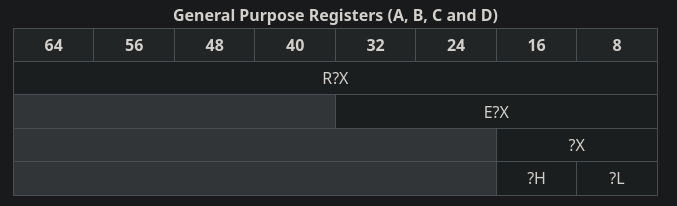
Like the above, a new name for the A register is EAX with the E added for Extended (again?). Finally, most computers use 64-bit architecture and the registers now are called RAX of similar, with R for register.
Calling the smaller registers is backwards compatible and there can be uses for it. Also, the word BYTE is used to describe a byte of information, WORD for two bytes, DWORD (double word) for 4 bytes and finally QWORD (quad word) for 8 bytes.
|                    RAX                   |  // 64-bit (QWORD)
				 	 |         EAX         |  // 32-bit (DWORD)
					             |   AX    |  // 16-bit (WORD)
					             | AH | AL |  //  8-bit (BYTE)
From Wikipedia
Usage of AL or similar#
Again, choosing the first register purely as example, there can sometimes be byte wide operations happening for example during encryption or string reading. Using a smaller segment of a register can be more efficient and overall is clearer to understand. For examples, when storing strings in memory, they are often terminated with a null (0x00) byte to state this is the end of the string. You might want to iterate through a string until the null is found. Some high level asm would be:
loop:
	mov al, [rsi] ; load the byte at address stored in rsi into al
	test al, al   ; simple way to see if al is null
	jz done       ; if it is, jump to `done`

	inc rsi       ; if not, increment rsi and loop again
	jmp loop

done:
	; continue doing whatever
In theory, similar logic can be applied to the smaller register calls, but think of it less than a different register but a smaller segment of a current register.
General Register Usage#
It’s not a crime to use whatever register you desire if your hardware allows it. However, compilers will often use them as they were intended, more out of convention than anything else. I’ve noticed through reverse engineering, it more or less falls in line this, but again - it’s not illegal to use general registers for whatever the code decides.
For brevity, I’ll name the registers by their 64-bit name, but the same logic applies for 8/16/32-bit.
RAX - The Workhorse#
Originally called the Accumulator, it’s the preferred register for most basic CPU activities. It’s also used often to store a return value from a function, like if you ran a function that went well, it might store a 0 in RAX, or if it had a cardiac arrest, it might assign a non-zero value to show what went wrong.
RBX - The Backup#
Originally the Base register. Simply put when you need to hold onto a value for extended periods, it can go here. Simple.
RCX - The Counter#
Remember the string loop above? What if you wanted to count the length of a string. Very commonly performed. You’d start by zeroing RCX, then in addition to incrementing RSI as we saw, you’d also increment RCX. When the loop finishes, RCX would hold the length of the string you just processed.
RDX - RAX’s Friend#
Originally the Data Register, RDX can be seen being used in conjunction with multiplication and division. For example, when you divide a number, the dividend would be stored in RAX and the remainder stored in RDX. Same goes if you’re multiplying and the value goes over the bits in RAX, the next set of bits are stored in RDX.
RSI/RDI - Source/Dest#
If you think back again to the string read example, normally something long like a string is read from RSI (source). The same can be said for RDI (destination) but the opposite. So maybe you have ten bytes of encrypted data, you could read each one from the source, do something to it, and store in the destination.
R8-R15 - New Kids on The Block#
When CPUs moved to 64-bit, it gained access to a whole new set of registers. They have no special purpose except the ability to store data in the CPU in more places.
RBP/RSP - Stack Related#
I’ll cover the stack and how it works in a future article, but when you need to offload data from the registers to maybe send to a function or just store it temporarily, the stack is where it’s put.
RIP - Instruction Pointer#
Arguably the most important register of them all. When a program is loaded into memory, the CPU needs to know what to run. the RIP will always hold the value of the next instruction to be run. When an instruction is executed, the RIP is incremented to the next instruction. It can also be manipulated, for example when running a jump instruction, it just replaces the value with the intended destination.
Conclusion#
This is just a high level breakdown of the registers, and ultimately the code can use whatever register it chooses however it wants to (except the last three, they’re more special). Having said that, you’ll find that the above is an acceptable rationalization of their use.
Further reading here: https://en.wikipedia.org/wiki/X86